CCB Tech Articles, Donna’s Low Tech Tips, Talking Calculator, September 30, 2019

September 30, 2019

Meet the talking calculator

Hi there!  It’s Donna and thank you for allowing me to come into your inbox.

Today, I’d like to talk about the talking calculator.

Let’s meet this product.


Meet the talking calculator

Believe it or not, such a neat little device or gadget certainly exists.  This product has certainly evolved from a clunky device to various versions that range from the nifty little stand alone to being incorporated in other gadgets and devices.


The talking calculator has come a very long way; from being a simple one with simple functions to a sophisticated one that includes scientific functions.  The stand alone talking calculator is still around but is threatening to leave our landscape and those that are now being included in other devices and gadgets are becoming more powerful and sophisticated.


In today’s world, you can find talking calculators with very clear voices.  The keys are superbly marked and it is relatively easy to learn how to use a talking calculator these days.


Some of the devices that include talking calculators include:  Braille note taking devices, combination talking clock and calculator devices, and of course there is the iPhone and iPad plus more.


So just go out there and make friends with the talking calculator.  I have known this product for a very long time now.


That’s it from me for this week.

If you would like to become a member of  my CCB Mysteries chapter you can do so for the price of $10 annually and in return you will receive unlimited access to either of the following libraries.

Recipes –

http://www.donnajodhan.com/library-recipes.html

Audio mysteries for all ages –

http://www.donnajodhan.com/library-audio-mysteries.html

Or you can subscribe to both for the price of $20 annually.

Now you  can subscribe to “‘Let’s Talk Tips”‘ which is my monthly resource for the most current and reliable informational tips available in the areas of Technology, Nutrition, Media, Business, and Advocacy.

http://bit.ly/ADJSubscribe


To contact me, send me an email at info@sterlingcreations.ca and I’ll be happy to respond.

Have yourselves a great day and see you next week.

Donna


CCB Tech Articles, Donna’s Low Tech Tips, Talking Bar Code Reader, September 23, 2019

September 23, 2019

Meet the talking bar code reader


Hi there!  It’s Donna and thank you for allowing me to come into your inbox.

Today, I’d like to talk about the talking bar code reader.

Let’s meet this product.


Meet the talking bar code reader

I have heard much about this nifty gadget but am yet to go out there and make friends with it.  It may be a bit pricy but I have heard that it sure does the trick.  It can read bar codes to you and I believe that you can also use it to store information on bar codes that it cannot recognize.


This great device has been around for quite some time now and is most useful when it comes to making sure that one’s boxes, tins, and cans are kept in neat order in one’s pantry.  Many stores that sell aids for blind persons would carry this product but with the advent of the iPhone and other mobile devices, more accessible barcode readers are coming onto the market.  Never the less, the talking bar code reader is most useful for those of us who are either totally blind or for those of us who have difficulty finding what we seek in our pantry.


So go out there and make friends with the talking bar code reader.


That’s it from me for this week.

If you would like to become a member of  my CCB Mysteries chapter you can do so for the price of $10 annually and in return you will receive unlimited access to either of the following libraries.

Recipes –

http://www.donnajodhan.com/library-recipes.html

Audio mysteries for all ages –

http://www.donnajodhan.com/library-audio-mysteries.html

Or you can subscribe to both for the price of $20 annually.

Now you  can subscribe to “‘Let’s Talk Tips”‘ which is my monthly resource for the most current and reliable informational tips available in the areas of Technology, Nutrition, Media, Business, and Advocacy.

http://bit.ly/ADJSubscribe


To contact me, send me an email at info@sterlingcreations.ca and I’ll be happy to respond.

Have yourselves a great day and see you next week.

Donna


First Public Beta of JAWS 2020 Posted with Improved OCR, Form Control Handling, Blind Bargains by J.J. Meddaugh on September 17, 2019

First Public Beta of JAWS 2020 Posted with Improved OCR, Form Control Handling, More

Author: J.J. Meddaugh

Date Written: Sep 17, 2019 at 4:38 PM

Date Saved: 9/19/19, 11:33 AM

Source: https://www.blindbargains.com/bargains.php?m=20489

The first public beta of JAWS version 2020 has been posted. It’s free for JAWS 2019users.

This version includes a variety of enhancements, including several improvements for web users. Many websites will double-speak names of controls because of the way they were programmed. This beta aims to reduce much of this double-speak as you move through forms. Improved support for modern web apps which use their own keyboard hotkeys is now included, with JAWS remembering the state of the virtual cursor across tabs in Chrome. This is especially useful for sites such as Gmail. Other improvements will benefit users of Microsoft Word, the Zoom conferencing platform, and the Convenient OCR feature. Check the source link to get yur beta copy. Here’s a list of what’s new, taken from the public beta page:

New Features Added in JAWS 2020

The following features are new to JAWS 2020.

Reduced Double Speaking of Form Control Prompts When navigating and filling out forms on the web, it has become increasingly common for web page authors to include the prompt inside the control in addition to assigning an accessible Tag for the control. While non-screen reader users only see the written prompt, those using a screen reader are getting both the Prompt and accessible Tag in Speech as well as Braille if a display is in use. Often times, the web page author has assigned the same text for each, so it appears the screen reader is double speaking. In JAWS 2020, we have greatly reduced the amount of double speaking of form controls as you navigate using speech and Braille by comparing the prompt and these tags, and only speaking or brailling them both if they are different.

Note: For Public Beta 1, only the double speaking of prompts has been completed. The Braille representation will be corrected for Public Beta 2 in early October.

Zoom Meeting Scripts Added for an Improved Experience Thanks to Hartgen Consulting, basic scripts for Zoom are now included directly in JAWS and Fusion to improve the experience when attending Zoom Meetings. This platform is used for our quarterly FS Open Line program as well as the free training webinars we hold each month. These scripts offer a more pleasant experience by giving more control over what you hear, without interrupting the flow as users enter or leave the room or make comments. Press INSERT+H to view a list of JAWS keystrokes available in Zoom such as turning off alerts, speaking recent chat messages, and more. You can also press INSERT+W to view a list of Zoom hot keys.

Hartgen Consultancy also offers more advanced scripts for Zoom Pro if you are interested.

Enhanced JAWS and Invisible Cursor Support for Windows 10 Universal Apps For years, JAWS users have relied on the JAWS cursor (NUM PAD MINUS) and Invisible cursor (NUM PAD MINUS twice quickly) to review and interact with areas in an application where the PC cursor cannot go. This includes reading textual information which is on-screen but not focusable, and interacting with controls which are only accessible using a mouse as the mouse pointer will follow the JAWS cursor and NUM PAD SLASH and NUM PAD STAR will perform a left and right click. However, the Off-Screen Model (OSM) which has traditionally been used to support the JAWS and Invisible cursors is becoming less and less available as newer technology such as UIA, found especially in Windows universal apps like the calculator or the Windows Store, is now being used exclusively for accessing screen content. This results in the JAWS and Invisible cursors becoming unusable when attempting to navigate in those windows. All you would hear in those cases was “blank” as you reviewed the screen. This is because the modern technology currently in use is not able to be captured by the traditional Off-Screen Model. In those cases, the only solution was using the Touch Cursor, something most users are not as familiar with.

JAWS 2020 now detects when focus is in an application where the OSM is not supported and will automatically use the new JAWS Scan cursor in these situations. You will use all of the same navigation commands as you would with the traditional JAWS cursor or the Invisible cursors.

For example, if you open the Calculator or Windows Store in JAWS 2020 and press NUM PAD MINUS, you will now hear JAWS announce “JAWS Scan Cursor” as these are apps that do not support the OSM. You can then use the ARROW keys like you always have done to move by character, word, line, as well as INSERT+UP ARROW to read the current line, or PAGE UP, PAGE DOWN, HOME, and END. The mouse pointer will also continue to follow as it always has. The only difference is that the cursor does not move from top to bottom or left to right. Instead, it moves by element the way the developer laid out the app.

While this works in many places, there are still some areas where more work by Freedom Scientific is required. For instance, if you use Office 365, and try to read your Account version information with the JAWS cursor commands, it is still not possible to navigate and read in these places. That work is underway and we plan to have an update for this area in the 2020 version soon. Stay tuned.

Convenient OCR Updated to Use the Latest OmniPage The recognition engine used by the JAWS Convenient OCR feature has been updated to Kofax OmniPage 20, formerly owned by Nuance. This offers greater accuracy when recognizing the text from on-screen images as well as text from images captured with a PEARL camera or scanner.

For users needing to OCR using Hebrew or Arabic, these languages will be included in later public beta builds or by the final release at the latest. Once these languages are working, they will be installed with any English or Western European download of JAWS and Fusion.

Virtual Cursor Toggle Now Tab Specific in Google Chrome Today, there are many web apps where using the Virtual Cursor is not the best approach. An example of this can be seen if you use Gmail in the Chrome Browser. In these cases, it makes sense to toggle the Virtual Cursor off by pressing INSERT+Z and then use this application with the PC cursor. Many users also regularly open multiple tabs (CTRL+T) so they can easily access different sites such as GMail plus one or two other pages by moving between the open tabs using CTRL+TAB. This can become frustrating as you need to constantly press INSERT+Z to get the right cursor in use as you switch between tabs.

Beginning with version 2020, we are introducing an option to help JAWS automatically remember the state of the Virtual Cursor for each tab once you set it. It will also announce whether the Virtual Cursor is on or off as you move between various tabs. Once you close the browser, or restart JAWS, it will default back to its default behavior so you will need to set this each day as you use it.

For the Public Beta, this feature is not turned on by default. It will be enabled by default In later Beta builds. If you would like to try it out in the first Beta, do the following:

  1. Press INSERT+6 to open Settings Center.
  2. Press CTRL+SHIFT+D to load the default file.
  3. Type “Tab” in the search field.
  4. Press DOWN ARROW until you locate “Virtual Cursor On/Off based on Browser Tabs.”
  5. Press the SPACEBAR to enable the option and then select OK.

Note: If you choose to enable this feature in public beta 1, you will hear the announcement of the Virtual Cursor state in certain situations as you navigate. This will be corrected in subsequent builds. Contracted Braille Input Enhancements For ElBraille users as well as those who regularly use a Braille display with their PC, JAWS 2020 offers significant improvements when typing in contracted Braille. In particular:

  • You should now be able to enter and edit text in numbered and bulleted lists in Word, WordPad, Outlook, and Windows Mail.
  • Contracted Braille input is now supported in more applications including PowerPoint and TextPad.
  • Improved Contracted Braille input in WordPad, especially when editing a numbered or bulleted list created in Word and opened in Wordpad. This includes properly handling wrapped items which previously showed the number or bullet on subsequent wrapped lines, rather than indenting the text.
  • Improved Contracted Braille input in Chrome, Google docs, and other online editors which can create bulleted and numbered lists.
  • Typing rapidly using Contracted Braille in Microsoft Office as well as other applications should no longer result in text becoming scrambled.

General Changes in Response to Customer Requests • While browsing the internet, JAWS will no longer announce “Clickable” by default as you move to various content.

  • You should no longer hear the message “Press JAWS Key+ALT+R to hear descriptive text” as you navigate form controls and certain other elements on the web.
  • By default in Word and Outlook, JAWS will no longer announce “Alt SHIFT F10 to adjust Auto Correction” when you move to something that was auto corrected previously.
  • JAWS and Fusion will no longer gather a count of all the objects, misspellings, grammatical errors, and so on when a document is opened in Word. This will enable documents to load much faster, including very large documents containing a lot of these items. You can always press INSERT+F1 for an overview of what the document contains.
  • Improved responsiveness when closing Word after saving a document.
  • The AutoCorrect Detection option, previously only available in the Quick Settings for Word, can now also be changed in the Quick Settings for Outlook (INSERT+V).https://support.freedomscientific.com/Downloads/JAWS/JAWSPublicBeta

Source: JAWS Public Beta

Category: News

No one has commented on this post.

You must be logged in to post comments.

Username or Email:

Password:

Keep me logged in on this computer

Or Forgot username or password?

Register for free

J.J. Meddaugh is an experienced technology writer and computer enthusiast. He is a graduate of Western Michigan University with a major in telecommunications management and a minor in business. When not writing for Blind Bargains, he enjoys travel, playing the keyboard, and meeting new people.


Thx, Albert


-=-=-=-=-=-=-=-=-=-=-=-

Groups.io Links: You receive all messages sent to this group.


View/Reply Online (#20583): https://groups.io/g/GTTsupport/message/20583

Mute This Topic: https://groups.io/mt/34202922/355268

Group Owner: GTTsupport+owner@groups.io

Unsubscribe: https://groups.io/g/GTTsupport/leave/4180960/1392965003/xyzzy  [albert.gtt@ccbnational.net]

-=-=-=-=-=-=-=-=-=-=-=-


CCB Tech Articles, Donna’s Low Tech Tips, A scam alert, September 16, 2019

September 16, 2019

Hi there!  It’s Donna and thank you for allowing me to come into your inbox.

Today, I’d like to introduce you to my scam alert.


A scam alert!


You are being offered a terrific package by your cable and tv provider


Believe it or not; they are out there and they are only waiting to pounce on those unsuspecting victims who only want to be able to have access to some great cable tv watching.  All you want to do is to be able to find ways to bundle all of your cable and Internet services into one cost effective package and all that these scammers want to do is to take advantage of your vulnerability.


So how does this all take place?

  • You receive a phone call with a terrific offer.
  • You are being offered a bundle that includes tv, cable, and internet and cell phone as an add on.
  • Rates are really enticing.
  • Bundles are flexible and for a good period of time.


  • Do not encourage this phone call.
  • Do not give out any info about the present services you receive, your name, or anything else.
  • Just ignore all of this.
  • Hang up and go about your business.


What happens if you choose to take this offer?  Well!  Your information will be used to help these hackers to start generating bills charging you for services that are non existent.  They will look real and soon you won’t be able to tell the real bills from the fake ones.


That’s it from me for this week.

If you would like to become a member of  my CCB Mysteries chapter you can do so for the price of $10 annually and in return you will receive unlimited access to either of the following libraries.

Recipes –

http://www.donnajodhan.com/library-recipes.html

Audio mysteries for all ages –

http://www.donnajodhan.com/library-audio-mysteries.html

Or you can subscribe to both for the price of $20 annually.

Now you  can subscribe to “‘Let’s Talk Tips”‘ which is my monthly resource for the most current and reliable informational tips available in the areas of Technology, Nutrition, Media, Business, and Advocacy.

http://bit.ly/ADJSubscribe


To contact me, send me an email at info@sterlingcreations.ca and I’ll be happy to respond.

Have yourselves a great day and see you next week.

Donna


CCB Tech Articles, Donna’s Low Tech Tips, Privacy Protection, 2019Sep09

September 9, 2019

Privacy protection


Hi there!  It’s Donna and thank you for allowing me to come into your inbox.

Today, I’d like to introduce you to my tip on privacy protection.


Privacy protection

We are constantly striving to protect ourselves from scams and scammers, but most of all we need to ensure that our privacy, confidentiality, and independence are kept safe from prying eyes and those who thrive on destroying our right to these precious commodities.


Applying for insurance policies

It does not matter what type of insurance policy you are applying for; life, accidental, house, or anything else.  It is probably best to do this with a reputable insurance company.


If you choose to go with an independent insurance agent, then you need to ensure that you know this person well enough to trust them with your private details such as date of birth, Social Insurance number and more.


Whichever alternative you choose, ask for an electronic copy to be sent to you so that you can read for yourself what you are about to sign.  When you are about to sign, best to take along someone that you trust so that they can read the hard copy to you so that you can ensure that your electronic copy matches what is being read.


That’s it from me for this week!

If you would like to become a member of  my CCB Mysteries chapter you can do so for the price of $10 annually and in return you will receive unlimited access to any of the following libraries.

Recipes – A collection of hard to find recipes

Audio mysteries for all ages – Comfort listening any time of the day

Home and garden – A collection of great articles for around the home and garden

Or you can subscribe to all 3 for the price of $30 annually.

Visit

http://www.donnajodhan.com/subscription-libraries.html


To contact me, send me an email at info@sterlingcreations.ca and I’ll be happy to respond.

Have yourselves a great day and see you next week.

Donna

CCB Tech Articles, Donna’s Low Tech Tips, Apps Round-up, September 2, 2019

September 2, 2019

Apps round up


Hi there!  It’s Donna and thank you for allowing me to come into your inbox.

Today, I’d like to introduce you to my apps roundup.

Enjoy!


1. App Wish List & Price Tracker (iOS, Free)


App Wish List lets you keep track of all the apps you’d like to get at a later time. Here’s how it works:


1) Apps are added to your wish list directly from within the App Store Using      the share extension.

2) Notifications are shown when there is a price drop or update of an app  > on      your wishlist.

3) You save money by waiting until the app you are interested in reaches The      perfect price.

4) Share the app discounts you’ve found with your friends and help them      save money too!


With App Wish List you can track an unlimited number of apps, there are no ads, and the app is completely free to use. Enjoy!


Current Version: 1.2.2 (November 8, 2018)


Read? App Wish List & Price Tracker’s AppleVis App Directory entry for more information [8]?


Visit? App Wish List & Price Tracker’s App Store page [9]?

https://www.applevis.com/apps/ios/shopping/app-wish-list-price-tracker


2. Bedr alarm clock radio (iOS, Free With In-App Purchases)


Wake up every day to your favourite radio station! Download this free app now and turn your iPhone into an alarm clock with radio streaming. With over 7,000 radio stations from all over the world, we deliver you the local news, sports, your favorite music and any radio station from any place in the world straight to your home.


with the free bedr radio app:


* wake up to radio stations from all over the world

* alarm clock with smooth alarm, snooze-timer, vibration and auto-stop

* snooze by simply tapping into the screen, tap twice to stop the alarm

* shake to stop the alarm but to continue the radio streaming (e.g. to Listen in the bathroom)

* artist and title of the current song

* use the night mode feature and turn your phone into a night clock

* adjustable brightness for the night clock


Current Version: 2.5.3 (November 15, 2018)


Read? Bedr alarm clock radio’s AppleVis App Directory entry for more information [10]?

https://www.applevis.com/apps/ios/music/bedr-alarm-clock-radio

Visit? Bedr alarm clock radio’s App Store page [11]?

https://itunes.apple.com/us/app/bedr-alarm-clock-

adio/id1053241118?mt=8


All recent app entries posted to AppleVis can be found at:


iOS [14]

https://www.applevis.com/apps/latest?type=ios_app_directory

Mac [15]

https://www.applevis.com/apps/latest?type=mac_app_directory

Apple Watch [16]

https://www.applevis.com/apps/latest?type=apple_watch_app_directo

y

Apple TV [17]

https://www.applevis.com/apps/latest?type=apple_tv_app_directory


That’s it from me for this week.

If you would like to become a member of  my CCB Mysteries chapter you can do so for the price of $10 annually and in return you will receive unlimited access to either of the following libraries.

Recipes –

http://www.donnajodhan.com/library-recipes.html

Audio mysteries for all ages –

http://www.donnajodhan.com/library-audio-mysteries.html

Or you can subscribe to both for the price of $20 annually.

Now you  can subscribe to “‘Let’s Talk Tips”‘ which is my monthly resource for the most

current and reliable informational tips available in the areas of Technology, Nutrition, Media, Business, and Advocacy.

http://bit.ly/ADJSubscribe


To contact me, send me an email at info@sterlingcreations.ca and I’ll be happy to respond.

Have yourselves a great day and see you next week.

Donna


CCB Tech Articles, Donna’s Low Tech Tips, Large Print Telephone, August 26, 2019

August 26, 2019

Meet the large print telephone


Hi there!  It’s Donna and thank you for allowing me to come into your inbox.

Today, I’d like to talk about the large print telephone.

Let’s meet this product.


Meet the large print telephone

When I had enough vision to see the large print, I found this product to be enormously helpful to me and now that I can no longer see the large print I still continue to appreciate the large keys.


Many of you have probably met this product already but I’d like to familiarize those of you who have not yet done so.  This is an excellent product for many of those who have difficulty seeing and navigating the normal keypad and screen of a regular telephone.


The keys are larger, and the print on the keys is also larger.  In addition, the screen is also larger thus making the display larger as well.  It is easier to use this phone and many of those who have difficulty seeing the keys and screen on a regular phone can certainly benefit from this great product.


The large print telephone is available at most stores that sell products for blind and partially sighted consumers and may even be available at some of the larger regular stores.


So go out there and make friends with the large print telephone.


That’s it from me for this week.

If you would like to become a member of  my CCB Mysteries chapter you can do so for the price of $10 annually and in return you will receive unlimited access to either of the following libraries.

Recipes –

http://www.donnajodhan.com/library-recipes.html

Audio mysteries for all ages –

http://www.donnajodhan.com/library-audio-mysteries.html

Or you can subscribe to both for the price of $20 annually.

Now you  can subscribe to “‘Let’s Talk Tips”‘ which is my monthly resource for the most current and reliable informational tips available in the areas of Technology, Nutrition, Media, Business, and Advocacy.

http://bit.ly/ADJSubscribe


To contact me, send me an email at info@sterlingcreations.ca and I’ll be happy to respond.

Have yourselves a great day and see you next week.

Donna


CCB Tech Articles, Donna’s Low Tech Tips, A scam alert, August 19, 2019

August 19, 2019

Hi there!  It’s Donna and thank you for allowing me to come into your inbox.

Today, I’d like to introduce you to my scam alert.


A scam alert You owe money to the Inland revenue services!


This type of scam comes in the form of a phone call and this call can occur at any time of the day.  As early as 7 am and as late as 8 pm.


Your name is usually not announced by the caller but be prepared to hear your name announced by the caller.  You are given a file number and a phone number to call and you are told that if you doo not call in a few days and a deadline is given for you to call, You will be arrested.


The give away here is that the voice at the other end is a synthesized voice!  Just simply hang up and go about your business.  This is nothing but a hoax and a laughable one at that.


That’s it from me for this week.

If you would like to become a member of  my CCB Mysteries chapter you can do so for the price of $10 annually and in return you will receive unlimited access to either of the following libraries.

Recipes –

http://www.donnajodhan.com/library-recipes.html

Audio mysteries for all ages –

http://www.donnajodhan.com/library-audio-mysteries.html

Or you can subscribe to both for the price of $20 annually.

Now you  can subscribe to “‘Let’s Talk Tips”‘ which is my monthly resource for the most current and reliable informational tips available in the areas of Technology, Nutrition, Media, Business, and Advocacy.

http://bit.ly/ADJSubscribe


To contact me, send me an email at info@sterlingcreations.ca and I’ll be happy to respond.

Have yourselves a great day and see you next week.

Donna


This blind woman says self-checkouts lower the bar(code) for accessibility | CBC News

If you have a visual impairment, the self-checkout phenomenon can make shopping a difficult and frustrating process.
— Read on www.cbc.ca/news/canada/newfoundland-labrador/self-checkouts-accessibility-concerns-1.5243720

CCB Tech Articles, Donna’s Low Tech Tips, Privacy Protection, August 12, 2019

August 12, 2019

Privacy protection


Hi there!  It’s Donna and thank you for allowing me to come into your inbox.

Today, I’d like to introduce you to my tip on privacy protection.


Privacy protection

We are constantly striving to protect ourselves from scams and scammers, but most of all we need to ensure that our privacy, confidentiality, and independence are kept safe from prying eyes and those who thrive on destroying our right to these precious commodities.


Applying for a credit card

once you have made up your mind which credit card you would like to apply for; next you need to find which bank issues said card.  Then you should go to said bank and ask for assistance to complete the application form.  It is always best for you to do it this way so that you do not need to depend on someone else to assist you with the hard copy form.


If you choose to do it the online way, then chances are that you would run into challenges with websites that are not very user friendly.


You could also apply for your card using the phone banking way.  However, you need to take the necessary precautions to ensure your privacy when your credit card confirmation letter arrives in the mail.


This letter will contain your credit card number and your 3 digit security code along with your expiry date.  Take this letter to your closest bank and ask staff to read this to you and copy it down in a format that you can read.  Keep this letter safe and do not forget to sign your credit card.  Sign it in front of a bank staff member to be safe.


That’s it from me for this week!

If you would like to become a member of  my CCB Mysteries chapter you can do so for the price of $10 annually and in return you will receive unlimited access to any of the following libraries.

Recipes – A collection of hard to find recipes

Audio mysteries for all ages – Comfort listening any time of the day

Home and garden – A collection of great articles for around the home and garden

Or you can subscribe to all 3 for the price of $30 annually.

Visit

http://www.donnajodhan.com/subscription-libraries.html


To contact me, send me an email at info@sterlingcreations.ca and I’ll be happy to respond.

Have yourselves a great day and see you next week.

Donna


CCB Tech Articles, Donna’s Low Tech Tips, Apps Round Up, August 5, 2019

August 5, 2019

Apps round up


Hi there!  It’s Donna and thank you for allowing me to come into your inbox.

Today, I’d like to introduce you to my apps roundup.

Enjoy!


  1. Ebates Rakuten: Get Cash Back (iOS, Free)


Get Cash Back rewards at your favorite stores! Get unbeatable shopping deals and save with promo codes & coupons from Ebates.


Save money and sign up for a FREE account – it’s easy! Explore deals, shop at 2,500+ stores AND earn Cash Back when you buy. You’ll also get a $10 Welcome Bonus!


3 reasons you’ll love the Ebates app:


* Shop & save: Earn up to 40% Cash Back

* 2,500+ stores: eBay, Walmart, Amazon, Macy’s, Sephora, Lyft rides,    Grubhub, DoorDash & many more!

* Buy best brands: Access offers on best-selling brands


Rakuten savings help you buy the things you want & save at the same time.  Earn money with your vacation, find the best discount deals at your favorite stores and shop clothes from top brands.


Current Version: 5.7.0 (April 19, 2019)


Read? Ebates Rakuten: Get Cash Back’s AppleVis App Directory entry for more information [6]?

https://www.applevis.com/apps/ios/shopping/ebates-rakuten-get-cash-back

Visit? Ebates Rakuten: Get Cash Back’s App Store page [7]?

https://itunes.apple.com/us/app/ebates-rakuten-get-cash-back/id723134859?mt=8


  1. Rocket (macOS, Free With In-App Purchases)


Mind-blowing emoji on your Mac.


Rocket is now the world’s first emoji picker for blind people!


The fastest, smoothest Slack-style emoji picker for your Mac


* Access to every emoji through the shortcut window

* Pick your favourite skin tone

* Light and dark themes


We’ll never nag you to upgrade, but if you want to step up your emoji game…


Pro


* Scroll and search your way through every emoji in the Search & Browse    window

* Use Rocket to send and store gifs, images, and memes

* Set custom emoji shortcuts and add your own emoji


Current Version: 1.5 (March 28, 2019)


Read? Rocket’s AppleVis App Directory entry for more information [8]?

https://www.applevis.com/apps/mac/utilities/rocket

Visit? Rocket’s website [9]?

https://matthewpalmer.net/rocket/emoji-for-blind-people.html


All recent app entries posted to AppleVis can be found at:


iOS [14]

https://www.applevis.com/apps/latest?type=ios_app_directory

Mac [15]

https://www.applevis.com/apps/latest?type=mac_app_directory

Apple Watch [16]

https://www.applevis.com/apps/latest?type=apple_watch_app_directory

Apple TV [17]

https://www.applevis.com/apps/latest?type=apple_tv_app_directory


That’s it from me for this week.

If you would like to become a member of  my CCB Mysteries chapter you can do so for the price of $10 annually and in return you will receive unlimited access to either of the following libraries.

Recipes –

http://www.donnajodhan.com/library-recipes.html

Audio mysteries for all ages –

http://www.donnajodhan.com/library-audio-mysteries.html

Or you can subscribe to both for the price of $20 annually.

Now you  can subscribe to “‘Let’s Talk Tips”‘ which is my monthly resource for the most

current and reliable informational tips available in the areas of Technology, Nutrition, Media, Business, and Advocacy.

http://bit.ly/ADJSubscribe


To contact me, send me an email at info@sterlingcreations.ca and I’ll be happy to respond.

Have yourselves a great day and see you next week.

Donna


CCB Tech Articles, Donna’s Low Tech Tips, Voice Dream Reader, July 29, 2019

July 29, 2019

Meet the Voice Dream Reader, a text to speech app


Hi there!  It’s Donna and thank you for allowing me to come into your inbox.

Today, I’d like to talk about the Voice Dream text to speech app.

Let’s meet this product.


Meet the Voice dream text to speech app


Well, I think you should take a long hard look at the article below and see what you think.  I have this app on my iPhone and I find it extremely helpful.  Enjoy!


Voice Dream Reader: Text To Speech iOS App – Release 2.8: Create Your Own Reading Experience


http://www.voicedream.com/?p=3271


I’m delighted to introduce Voice Dream Reader version 2.8. The new release brings capabilities more advanced than any voice reader on any platform or at any price. The result is a whole new level of flexibility to create your own reading experience.


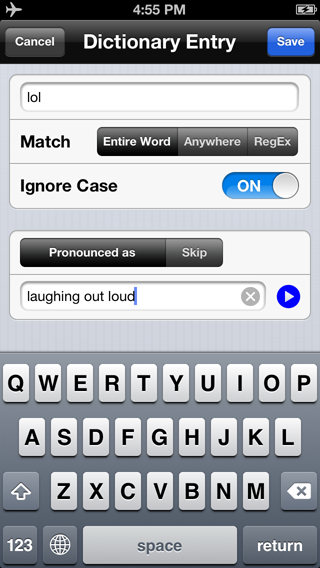
http://www.voicedream.com/wp-content/uploads/2013/06/PronunciationDictionary.png


Pronunciation Dictionary


Personal Pronunciation Dictionary


Don’t like how a voice pronounces a word? Want to skip repeating header text in a PDF document? Release 2.8 introduces a powerful personal pronunciation dictionary. You can tell the speech engine to pronounce a word as if it’s a different word. For example, “lol” can be pronounced as “laughing out loud,” or “MAD” as “M.A.D”, spelling out the acronym rather than saying it as a word. And you can skip any text so they’re not spoken at all.


For technically sophisticated users, I offer you Regular Expression or RegEx, a way to express any pattern in text. For example, to skip the chapter-verse numbers in the Bible, you would define a rule to skip RegEx “[0-9]+:[0-9]+”. What you can do with RegEx is limitless.


Each language has its own dictionary, and the pronunciation rules work regardless which voice you use, whether the voice is from Acapela or NeoSpeech. If you use TTS more than a few minutes a day, you’ll be very glad to have this feature.


Configurable Navigation


The other major feature is Configurable Navigation. Version 2.8 introduces a concept called “Navigation Unit,” which can be set to Sentence, Paragraph, Page, Chapter, Bookmark, Highlight, 15, 30, or 60 seconds – basically all important markers in text. In the previous version, the rewind and fast forward buttons go backward or forward by 30 seconds. In the new version, they move the speech cursor backward or forward by any Navigation Unit you set. For example, you can go to the next page in a PDF document or DAISY eBook. Or, go through all your highlighted text one by one. And you can set Navigation Unit on the fly by tapping on the rewind or fast forward button and hold.


If you assign rewind and fast forward to the remote control buttons on your headset, you can move around the text without touching your device. Or, you can swipe left or right with two finger and they’re the same as rewind and fast forward. How cool is that!


Speaking of gestures, I added a gesture that VoiceOver users have long enjoyed: Double-finger double tap, which is the same as the Play-Pause button. Now you can Play or Pause without exiting full screen.


Customers asked to be able to customize their reading experience by setting different speech rates easily: You might want to listen to a book in your native language faster than in a foreign language, and a scientific paper should be read more slowly than a popular novel. In the new release, you can set a default speech rate for each voice, and you can override defaults by setting a speech rate for each article or book. You can adjust the pitch and volume for each voice, too!


Better Support for Visual Reading


Voice Dream Reader has always supported both visual reading and voice reading and mixing them in a natural and fluid way. The features I mentioned thus far help create a better voice reading experience, but I haven’t forgotten about visual readers. I added a Scroll by Page mode (as opposed to free scrolling), increased the maximum font size to 80, added the option to turn off Word or Line highlighting. And it’ll remember the visual location where you left off in addition to the speech location, so when you open it next time it’ll go right to the text you were looking at before.


Here’re the rest of the new features in this release:


*        Footer to indicate and set page, percent, chapter, and Navigation Unit.

*        Sort by Date, Title, Author and Size for each folder.

*        New Chinese and Japanese voices from NeoSpeech.


And as always, existing customers get these new features for free.


In a little more than a year, Voice Dream Reader has come a long way from the early days of being a simple text “player” with one voice. With your support and encouragement, Voice Dream Reader will continue to get better.  Please email me with your comments and ideas for improvements. I love to hear from you.


Contact Us:

Support:  support@voicedream.com

General:  winston@voicedream.com

Twitter:  http://twitter.com/VoiceDreamApp


Press Contact:

Email:  media@voicedream.com


That’s it from me for this week.

If you would like to become a member of  my CCB Mysteries chapter you can do so for the price of $10 annually and in return you will receive unlimited access to either of the following libraries.

Recipes –

http://www.donnajodhan.com/library-recipes.html

Audio mysteries for all ages –

http://www.donnajodhan.com/library-audio-mysteries.html

Or you can subscribe to both for the price of $20 annually.

Now you  can subscribe to “‘Let’s Talk Tips”‘ which is my monthly resource for the most current and reliable informational tips available in the areas of Technology, Nutrition, Media, Business, and Advocacy.

http://bit.ly/ADJSubscribe


To contact me, send me an email at info@sterlingcreations.ca and I’ll be happy to respond.

Have yourselves a great day and see you next week.

Donna


CCB Tech Articles, Donna’s Low Tech Tips, tactile screen protector, July 22, 2019

Sorry, this tip is a little late.

July 22, 2019

Meet the tactile screen protector


Hi there!  It’s Donna and thank you for allowing me to come into your inbox.

Today, I’d like to talk about the tactile screen protector.

Let’s meet this product.


Meet the tactile screen protector


I met this very interesting product a few years ago and I am so happy that I have managed to make friends with it.  I am not disappointed as this product helps me to be more agile on my iPhone’s screen and makes things faster and easier for me.

What is this product all about?  Well, please read on.


This is one of the simplest but most useful products that I have come across in a very long time.  Here is how it works.  Just take the card of dots and paste it on the screen of your I device.  There is a separate screen protector for each device.  The dots enable a blind person to successfully and easily navigate the screen.  The dots are strategically positioned so that with a wee bit of learning a blind person can easily navigate to where they need to go without too much difficulty.


Once a blind person gets the hang of where to go and how to navigate using these precious little dots, then the rest is so very easy.  It is not too difficult to get used to and you can access whatever you want with just one move and it saves you the frustration of having to navigate all over the place.


This is a terrific invention and whoever thought of this concept should be heartily congratulated.  I bought my tactile screen protectors for my iPhone and Ipad from the AT Guys in Michigan.


Just go out there and make friends with the tactile screen protector.


That’s it from me for this week.

If you would like to become a member of  my CCB Mysteries chapter you can do so for the price of $10 annually and in return you will receive unlimited access to either of the following libraries.

Recipes –

http://www.donnajodhan.com/library-recipes.html

Audio mysteries for all ages –

http://www.donnajodhan.com/library-audio-mysteries.html

Or you can subscribe to both for the price of $20 annually.

Now you  can subscribe to “‘Let’s Talk Tips”‘ which is my monthly resource for the most current and reliable informational tips available in the areas of Technology, Nutrition, Media, Business, and Advocacy.

http://bit.ly/ADJSubscribe


To contact me, send me an email at info@sterlingcreations.ca and I’d be happy to respond.

Have yourselves a great day and see you next week.

Donna


CCB Tech Articles, Donna’s Low Tech Tips, A scam alert, July 15, 2019

Sorry, this tip is a little late.

July 15, 2019

Hi there!  It’s Donna and thank you for allowing me to come into your inbox.

Today, I’d like to introduce you to my scam alert.


A scam alert

Be ware of the insurance sales person


They could show up at your door or they could call you.  On the phone they may call you by your first or last name and they would have gotten this from any source.  The phone book is usually the primary source of research for these types of scammers be it online or print or even in the comfort of a public library.


Here are some of the promises that they may try to reel you in with.  They promise to give you super rates for fantastic packages.  Anything ranging from house insurance to disability insurance.  Medical insurance to life insurance.


Now comes the crunch!  They can either claim to represent a reputable firm or more disasterous they tell you that they  are an independent agent.


If they say they’re independent; simply ignore and turn away. If they claim to represent a reputable firm, Then check out their credentials before you do anything.


You need to insist on meeting them face to face if they call you on the phone.  Additionally and most important; and at their company’s offices.  If they refuse, simply ignore them and hang up.


Until next week then!


That’s it from me for this week.

If you would like to become a member of  my CCB Mysteries chapter you can do so for the price of $10 annually and in return you will receive unlimited access to either of the following libraries.

Recipes –

http://www.donnajodhan.com/library-recipes.html

Audio mysteries for all ages –

http://www.donnajodhan.com/library-audio-mysteries.html

Or you can subscribe to both for the price of $20 annually.

Now you  can subscribe to “‘Let’s Talk Tips”‘ which is my monthly resource for the most current and reliable informational tips available in the areas of Technology, Nutrition, Media, Business, and Advocacy.

http://bit.ly/ADJSubscribe


To contact me, send me an email at info@sterlingcreations.ca and I’ll be happy to respond.

Have yourselves a great day and see you next week.

Donna


CCB Tech Articles, Donna’s Low Tech Tips, Privacy Protection, July 8, 2019

July 8, 2019

Privacy protection


Hi there!  It’s Donna and thank you for allowing me to come into your inbox.

Today, I’d like to introduce you to my tip on privacy protection.


Privacy protection

We are constantly striving to protect ourselves from scams and scammers, but most of all we need to ensure that our privacy, confidentiality, and independence are kept safe from prying eyes and those who thrive on destroying our right to these precious commodities.


Applying for health cards

This time, and if you do not have a trusted person to help you, give a call to your provincial MPP’s office.

If you do not know their number, then follow these steps.

Phone 1800 622 6232 and ask for the number of your Federal MP.

Upon obtaining this number call it and ask for the number of your provincial MPP.

Then call this number and explain what you are attempting to do.

Tell them that you are vision impaired and that you need assistance to obtain your health card.

Tell them exactly what you need; you need to know what documentation you need to take, where to go, and if possible to find someone who can go with you if you do not have a trusted person to go with you.


That’s it from me for this week!

If you would like to become a member of  my CCB Mysteries chapter you can do so for the price of $10 annually and in return you will receive unlimited access to any of the following libraries.

Recipes – A collection of hard to find recipes

Audio mysteries for all ages – Comfort listening any time of the day

Home and garden – A collection of great articles for around the home and garden

Or you can subscribe to all 3 for the price of $30 annually.

Visit http://www.donnajodhan.com/subscription-libraries.html


To contact me, send me an email at info@sterlingcreations.ca and I’d be happy to respond.

Have yourselves a great day and see you next week.

Donna


BlindShell, Simple, intuitive and accessible phones for visually impaired

BlindShell, Simple, intuitive and accessible phones for visually impaired
Date Saved: 7/5/19, 1:50 PM
Source: https://www.blindshell.com/
Note: Check above and below links for videos about this device.

New BlindShell Classic
Over the past few years, we have sold phones for the visually impaired to thousands of customers across 20 countries. We have worked to create a phone that would be durable, stylish, and most importantly, easy to use for the blind and visually impaired. Based on the feedback and input from our users, we introduced the BlindShell Classic last year. This phone encompasses the best of what the world of mobile phones for the blind offers.
• Carefully designed keypad with comfortable buttons.
• Voice Control or tactile keypad for the simplest to use phone yet.
• Optimized shape, which perfectly fits your hand.
• Lifetime updates and fantastic support.

Blindshell Classic
• Single button quick dial
• SOS emergency button
• Quick menu navigation by shortcuts
• FM radio
• Calendar
• E-mail
• Voice control
• Text dictation
• Object tagging

BLINDSHELL 2 BAROQU
• Voice control
• Text dictation
• Object tagging
• Color recognition
• Mp3 and audio-book player
• GPS position
• Games
• WhatsApp
• Facebook Messenger

WHAT SEPARATES BLINDSHELL FROM THE REST?
First and foremost, it’s been designed to be helpful. No frills. We’ve listened to our customers and honed its features to be simple. The BlindShell Classic caters to the actual needs of visually impaired users. The physical keypad and large assortment of applications are designed and chosen specifically for the blind user’s needs.
It is truly intuitive to use. You can either use the keypad or control your phone by voice. And yes, you’ll figure out how to operate it in less than 30 minutes.
Lastly, we wanted to develop a phone which will last. That’s why we carefully chose the BlindShell Classic design to be practical, sturdy, and easy to use. The lifelong free updates give peace of mind that you will be happy with your purchase for years to come.

Demonstration Video Re-posted from Carrie Morales, Live Accessible:
Hey Everyone,
The BlindShell Classic Phone is coming out to the US and it’s a phone that’s specifically designed for the blind and visually impaired. It’s a great option for someone looking for a phone that has physical buttons, very easy to use, and totally accessible. Here’s a review I did of the phone if anyone is interested! https://youtu.be/XSE8grhy_8g

Carrie Morales
Website: LiveAccessible.Com
YouTube: Live Accessible
Instagram: @LiveAccessible
Twitter: @LiveAccessible
Email: carrie@liveaccessible.com

*Picture Description: Text reads Live accessible: blindness or Low Vision does not define or limit you on a blue background

CCB Tech Articles, Donna’s Low Tech Tips, Apps Round-up, July 1, 2019

July 1, 2019

Apps round up


Hi there!  It’s Donna and thank you for allowing me to come into your inbox.

A belated happy Canada Day to everyone!

Today, I’d like to introduce you to my apps roundup.

Enjoy!


1. Cardhop (iOS, US$3.99)

Until now, managing and interacting with your contacts has been a real frustration. Cardhop’s magical parsing engine is incredibly intuitive, letting you search, add, edit, and interact with your contacts using a simple sentence!


Just type in “John G” and John’s card will instantly appear. Or enter “Sarah Smith sarah@cardhopapp.com” and Cardhop will add a new contact to Sarah’s card. Or type in “call Michael S” and Cardhop will instantly start a phone call.


SEARCH, ADD, EDIT, AND INTERACT WITH YOUR CONTACTS LIKE NEVER BEFORE


* Tap on the Cardhop search field

* Type in the details for your contact

* That’s it!


FEATURES

* A beautiful and simple contacts app, designed exclusively for your iPhone    and iPad

* Instantly works with your existing iOS contacts, there’s nothing to    configure

* Groups: quickly toggle contact groups with a tap

* Notes: a convenient and powerful way to add notes to your contacts,    helping you to strengthen your relationships

* Recents: quickly interact with your recent contacts

* Birthdays: receive birthday notifications, instantly see upcoming    birthdays, and easily send a wish on their special day

* iOS widget to quickly access your favorite contacts

* Siri Shortcuts

* Full accessibility and VoiceOver support

* Dark and light themes

* And much, much more!


POWERFUL ACTIONS

* Quickly interact with your contacts with the following actions: Call,    Copy, Directions, Email, FaceTime, FaceTime Audio, Facebook Messenger,    Large Type, Message, Skype, Telegram, Twitter, URL, Viber, and VoIP

* Simply enter an action or abbreviation (which you’ll find in the Help    Book by entering “?” or “help”) followed by your contact’s name and    Cardhop will handle the rest

* Even better, some actions are flexible. For example, you can add a    subject to an email by entering “email Kent Lunch tomorrow?” and the    email including the subject will instantly appear, ready to go!

* Customizable quick actions are also available per contact, allowing for    single-tap actions


Cardhop — the contacts app you’ll actually want to use.

Current Version: 1.0.1 (March 30, 2019)

Read Cardhop’s AppleVis App Directory entry for more information

https://www.applevis.com/apps/ios/productivity/cardhop

Visit Cardhop’s App Store page

https://itunes.apple.com/us/app/cardhop/id1448744070?mt=8&at=11l4LS

Read about the Mac version of Cardhop on AppleVis.

https://www.applevis.com/apps/mac/productivity/cardhop


2. WaterMinder® (iOS, US$4.99)


Get help with WaterMinder®, an easy, intuitive app to track your water intake. Based on your body weight (or your personal goal), WaterMinder will remind you to drink water to reach your daily goals. By seeing current water fill visually and in percents you will instantly know how well you are hydrated!


Keeping track of your daily water intake needs and making sure your body is well hydrated is not an easy task in todays busy world. Let WaterMinder help you!


Main Features

* Apple Watch app

* Today Widget

* iMessage Stickers

* Clean visual view of your current water fill

* Simple, quick and easy to use interface (just tap on 1 icon and a menu    opens with your options to log/track your water intake)

* Pre-defined cups for quick tracking

* Create custom cups (size, icon, color, drink type)

* Create unlimited custom reminders

* History and Graph, see your progress

* US oz, UK oz, L and ML units

* Earn and Share your Achievements

* Free guide to drinking water


Stay healthy, and drink more water – hydrate yourself!


Current Version: 3.7.8 (January 28, 2019)

Read WaterMinder®’s AppleVis App Directory entry for more information

https://www.applevis.com/apps/ios/health-and-fitness/waterminder

Visit WaterMinder®’s App Store page

https://itunes.apple.com/us/app/waterminder/id653031147?mt=8&at=11l4LS


All recent app entries posted to AppleVis can be found at:

iOS http://www.applevis.com/apps/latest?type=ios_app_directory

Mac http://www.applevis.com/apps/latest?type=mac_app_directory

Apple Watch http://www.applevis.com/apps/latest?type=apple_watch_app_directory

Apple TV http://www.applevis.com/apps/latest?type=apple_tv_app_directory


That’s it from me for this week.

If you would like to become a member of  my CCB Mysteries chapter you can do so for the price of $10 annually and in return you will receive unlimited access to either of the following libraries.

Recipes –

http://www.donnajodhan.com/library-recipes.html

Audio mysteries for all ages –

http://www.donnajodhan.com/library-audio-mysteries.html

Or you can subscribe to both for the price of $20 annually.

Now you  can subscribe to “‘Let’s Talk Tips”‘ which is my monthly resource for the most

current and reliable

informational tips available in the areas of Technology, Nutrition, Media,

Business, and Advocacy.

http://bit.ly/ADJSubscribe


To contact me, send me an email at info@sterlingcreations.ca and I’d be happy to respond.

Have yourselves a great day and see you next week.

Donna

CCB Tech Articles, Donna’s Low Tech Tips, Pocket TimeBomb, June 24, 2019

June 24, 2019

Meet the pocket timebomb


Hi there!  It’s Donna and thank you for allowing me to come into your inbox.

Today, I’d like to talk about the pocket timebomb.

Let’s meet this product.


Meet the pocket timebomb


I have just learned about this neat little gadget and now it is time for me to introduce it to you. From what I have read below, it is neat, nifty, and very versatile.  I’ll leave it up to you to make up your mind but please!  Go out there and make friends with the pocket timebomb!


Pocket TimeBomb


Pocket TimeBomb is a vibrating alert that aims to help increase your productivity in the office. It constantly prompts you of the time by vibrating in your pocket.


Pocket TimeBomb – the 4 in 1 Vibrating Alert


#1. Regular Mode

Regular Mode increases your productivity by giving you a better sense of time. You can customize it to vibrate from every 5 mins to 2 hours, with different vibration patterns. Hence, you can be fully aware of the time even if you are sitting in a quiet meeting room or busy with your work.


#2. Presentation Mode

Pocket TimeBomb is also a presentation timer. It can send you a signal when your presentation time is about to run out so that you can quickly wrap it up.


#3. Power Nap Mode

Studies show that power napping is essential to increase productivity. In this mode, Pocket TimeBomb can act as a vibrating alarm clock to wake you up from your nap. You can also select background music and play them within the app.


#4. Reminder Mode

You can set personal reminders to alert you at any specific time of important meetings and appointments.


That’s it from me for this week.

If you would like to become a member of  my CCB Mysteries chapter you can do so for the price of $10 annually and in return you will receive unlimited access to either of the following libraries.

Recipes –

http://www.donnajodhan.com/library-recipes.html

Audio mysteries for all ages –

http://www.donnajodhan.com/library-audio-mysteries.html

Or you can subscribe to both for the price of $20 annually.

Now you  can subscribe to “‘Let’s Talk Tips”‘ which is my monthly resource for the most current and reliable

informational tips available in the areas of Technology, Nutrition, Media,

Business, and Advocacy.

http://bit.ly/ADJSubscribe


To contact me, send me an email at info@sterlingcreations.ca and I’d be happy to respond.

Have yourselves a great day and see you next week.

Donna

CCB Tech Articles, Donna’s Low Tech Tips, scam alert, June 17, 2019

June 17, 2019

Scam Alert


Hi there!  It’s Donna and thank you for allowing me to come into your inbox.

Today, I’d like to introduce you to my scam alert.


A scam alert

You are being invoiced


This alert is for those who buy and sell products and services on the Internet.

You receive an email telling you that you need to take care of an invoice and if you do not recognize the sender, then please delete.


Or if you are very sure that you do not need to take care of payment for any invoice, then you need to delete this email as quickly as you can.


If you make the mistake to reply then you have just compromised your email and then the trouble starts.  How could this be?  Very simple!


If you reply to this email to let them know that they have the wrong person, they will simply use your email address to start doing research on you.  You would be amazed to know what results the  Internet can yield when it comes to giving out info on you based on your email.


Another path for these so-called hackers and scammers to use would be to now take your email address and to start sending you emails that are loaded with attachments that can potentially cause great damage to your system.


That’s it from me for this week.

If you would like to become a member of  my CCB Mysteries chapter you can do so for the price of $10 annually and in return you will receive unlimited access to either of the following libraries.

Recipes –

http://www.donnajodhan.com/library-recipes.html

Audio mysteries for all ages –

http://www.donnajodhan.com/library-audio-mysteries.html

Or you can subscribe to both for the price of $20 annually.

Now you  can subscribe to “‘Let’s Talk Tips”‘ which is my monthly resource for the most current and reliable

informational tips available in the areas of Technology, Nutrition, Media,

Business, and Advocacy.

http://bit.ly/ADJSubscribe


To contact me, send me an email at info@sterlingcreations.ca and I’d be happy to respond.

Have yourselves a great day and see you next week.

Donna


CCB Tech Articles, Donna’s Low Tech Tips, Privacy Protection, June 10, 2019

June 10, 2019

Privacy protection


Hi there!  It’s Donna and thank you for allowing me to come into your inbox.

Today, I’d like to introduce you to my tip on privacy protection.


Privacy protection

We are constantly striving to protect ourselves from scams and scammers, but most of all we need to ensure that our privacy, confidentiality, and independence are kept safe from prying eyes and those who thrive on destroying our right to these precious commodities.


Completion of college and university applications

Here, a good idea would be for you to visit the office for special needs students at the college or university that you are applying to and seek their assistance.

You would be amazed to find that these offices are extremely helpful and that staff are standing by to help you.

To find the phone number for the college or university in question, you could start by calling the main information number and then asking to be connected to the office for special needs students.

If the operator is unable to help you then ask for the registrar’s office.


That’s it from me for this week!

If you would like to become a member of  my CCB Mysteries chapter you can do so for the price of $10 annually and in return you will receive unlimited access to any of the following libraries.

Recipes – A collection of hard to find recipes

Audio mysteries for all ages – Comfort listening any time of the day

Home and garden – A collection of great articles for around the home and garden

Or you can subscribe to all 3 for the price of $30 annually.

Visit http://www.donnajodhan.com/subscription-libraries.html


To contact me, send me an email at info@sterlingcreations.ca and I’d be happy to respond.

Have yourselves a great day and see you next week.

Donna